Overview
The Other Members tab lets you link another owner to an existing owner record and choose which of that owner's horses they can access. Use it when someone (for example a partner, family member or syndicate representative) needs visibility of an owner's horses.
Before you start
- You are signed in to the Prism web portal with access to the Owner module.
- The person you want to add already exists as an owner with an email address. If not, use + Add new in the owner search (step 4) or + Add Owner in the owner list.
- The main owner has at least one horse, so there is something to grant access to.
Add a member to an owner
The whole task takes seven steps and ends with the member listed in the Other Members tab.
Step 1 — Open the Owner
Click Owner in the top navigation, then select the owner in the All Owners list on the left (or use Search Owner). The owner's Profile tab opens.
Step 2 — Go to Other Members.
Click the Other Members tab. The table shows Name, Email and Horse Access; a new owner shows "There is currently no data". Click + Add Member at top right.
Step 3 — Search for the owner to add.
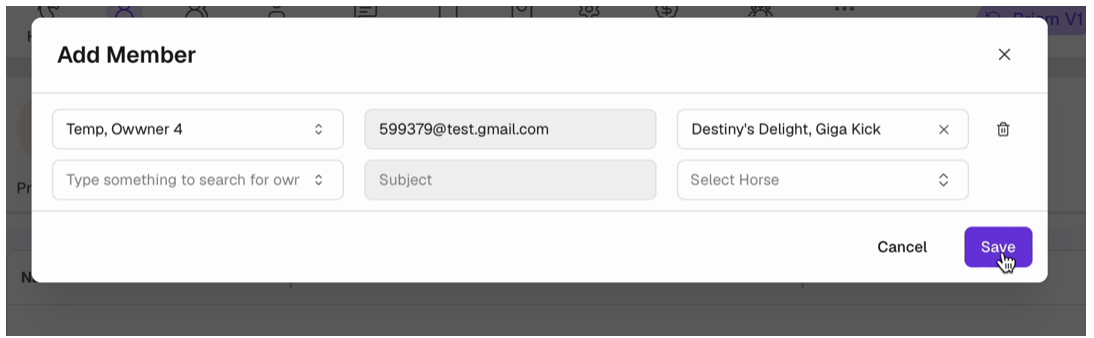
In the Add Member window, click the first field ("Type something to search for owner"). Type a name or scroll the list, then click the owner. If the person is not an owner yet, click + Add new.
Step 4 — Check the email.
The owner's email fills in automatically and is read-only. A new empty row appears underneath so you can add more members in the same window.
Step 5 — Choose horse access.
Open Select Horse and tick the horses this member can see.
Step 6 — Save.
Close the dropdown, check the selected horses shown in the field (for example "Destiny's Delight, Giga Kick"), then click Save.
Step 7 — Confirm
The window closes and the member appears in the table with their name, email and horse access. More than one horse shows as Multiple Horses (n).
Manage existing members
Each member row has three action icons on the right. The recording shows the icons but does not use them, so the descriptions below are based on the icon only.
|
Icon
|
Likely action
|
|
Pencil
|
Edit the member's horse access
|
|
Envelope
|
Send an email / invite to the member
|
|
Bin
|
Remove the member from this owner
|
Open question: confirm the envelope action (invite vs. general email) and whether removal asks for confirmation.
Field reference and notes
|
Field
|
Required
|
Behaviour
|
|
Owner search
|
Yes
|
Searchable list of existing owners; + Add new creates one
|
|
Email (shown as "Subject" when empty)
|
Auto
|
Filled from the selected owner; read-only
|
|
Select Horse
|
Yes (assumed)
|
Multi-select of the main owner's horses; All Horses ticks every horse
|
|
Bin icon (per row)
|
—
|
Removes that row from the Add Member window before saving
|
- Save stays disabled until an owner is selected.
- You can add several members in one go: each selected owner adds a new empty row.
- Choosing All Horses selects the horses the owner has today; it is not confirmed whether horses added later are included automatically.
- The owner search list also shows the owner you are editing (e.g. Temp, Owner 2 inside their own record). Avoid selecting the same owner as their own member.
- Cancel or × closes the window without saving.
Related Articles
How Syndicator or Owner requests horse
Via the Prism Owner Portal, owners will sometimes request access to horses in your stable if they are Owners of that horse. This is usually when they are syndicate members or 'other owners' not responsible for payments, and the manager of a syndicate ...
ATA PORTAL
Overview The ATA Hub connects ATA admins with Prism trainers (referred to as "Owners" in the ATA portal) through two main channels: Public Announcements: Website articles visible to everyone Private Communications: Stable Updates visible only to ATA ...
How to manage Owner Contracts
Where you need to view, preview, attach or re-send contracts for an Owner, the Contract tab is available under each Owner profile. View Contract List Click on Owner in the top menu. Select an Owner, then go to the Contract tab. A list of contracts ...
How to configure Owner Groups
Owner Groups can be configured to allow you to target certain owners in Stable Updates. You may wish to group similar owners based on their interests. Likewise, if you have a group of Owners who don’t currently own a share in any horse, you can ...
What's new in Owner App
I. Accounts tab We’ve refreshed the Accounts tab with a new interface and flow. This update is designed to give users a clearer view and easier management of balances and outstanding amounts. 1. Manage balance with the new Summary layout When users ...